●moray: ssh, sftp & terminal

~ moray 1.2.0 — out now

The SSH client that feels like Apple made it

A real terminal, an SFTP file manager with a transfer queue, port-forwarding tunnels and proper key security — on iPhone · iPad · Mac. Every new server is shown to you before it’s trusted. Your keys never leave the Keychain.

no account
Nothing to sign up for. Ever.
no vendor server
Sync is your iCloud, or nothing.
keys stay put
Private keys live in the Keychain.

deploy@prod-web-1 — moray

prod-web-1naspihole

# your homelab, from the sofa

ssh deploy@prod-web-1

✓ host key pinned · key from Keychain · Face ID

Last login: Sat Aug 1 09:14 from 10.0.0.4

systemctl status api --no-pager

● api.service — active (running) 6 days ago

docker compose ps

api running web running db running

tunnel start postgres

→ localhost:5432 forwarded · Live Activity on

esctab^C^D↑↓paste
01 — features

Everything you actually do over SSH

Not a toy shell in a text field. A terminal, a file manager, tunnels and keys — each one built to the standard you would expect from a Mac app, on every device you own.

terminal

A real terminal, not a text box

SwiftTerm over SwiftNIO SSH: full color, a fast keyboard and scrollback you can search. Open sessions as tabs, split them side by side on the Mac (⌘D, ⇧⌘D), and run commands automatically on connect. Pick SF Mono, Menlo or any monospaced font you have, set the line height, and let Option act as Meta. On iPhone and iPad the Smart Bar keeps Esc, Tab, Ctrl, arrows and paste one tap away.

Moray on Mac: a terminal session with colored ls output, git status and a running start script.

trust

See a server before you trust it

The first time you connect, Moray shows the server's fingerprint and its key picture — the same randomart ssh-keygen draws — and waits for Trust & Connect. If a key ever changes, a “Server identity changed” screen puts the old and new keys side by side, with Cancel as the default.

+--[ED25519 256]--+

| .o=*+. |

| . +.=o . |

| o.B o |

+----[SHA256]-----+

→ Trust & Connect · or Cancel

files

SFTP, browsed like Finder

Browse, upload, download, rename and delete, with Quick Look and an in-app text editor. On the Mac, Files is a sortable table — name, size, modified, kind, permissions — and a file dropped from Finder onto a terminal uploads to the folder that shell is in. With Pro, iPad and Mac get two panes that copy files and whole folders between servers.

Moray on Mac: the SFTP file manager showing a remote folder with permissions and file sizes.

transfers

A transfer queue you control

Every upload, download and copy in one list, with its speed and time left. Drag waiting files into a new order, rename them before they land, pause and resume — Moray checks the file hasn't changed before it carries on — retry what failed and clear what's done.

Transfers · 3 waiting

↑ backup.tar.gz 62% · 4.1 MB/s

‖ logs/ paused

↻ db.sql failed · retry

filesappPRO

Your server, inside the Files app

With Moray Pro, switch a host on and it mounts as a location in Files on iPhone and iPad — so every other app on the device can open from it and save back to it. No copy in, edit, copy out. Moray doesn't even have to be running.

Files ▸ Browse ▸ Locations

Moray → prod-web-1

→ open, edit and save from any app

history

It remembers what you typed

Every command you run is kept per host, searchable, and one tap from running again — because retyping a long docker line on a phone keyboard is the worst part of SSH from a device. Start a command with a space to keep it out, and passwords typed at a prompt are never recorded.

History · prod-web-1

$ docker compose logs -f api --tail 200

→ tap to run · 12× · 2h ago

tunnelsPRO

Port forwards that read the way they travel

Forward a local port to a database, dashboard or service behind your server. Import the LocalForward lines from your existing ~/.ssh/config and start every tunnel with one tap. Each one reads “This device :5432 → prod-db → localhost:5432”; on iPhone a Live Activity keeps them in view, and on the Mac they live in the menu bar.

$ grep LocalForward ~/.ssh/config

LocalForward 5432 localhost:5432

LocalForward 6379 localhost:6379

→ 2 tunnels imported · tap to start

keys

Keys done properly

Generate Ed25519 keys, or import Ed25519 and RSA keys — on the Mac, straight from ~/.ssh, with your hosts linked to their IdentityFile. They live in the device Keychain: encrypted, biometric-gated, and never synced unless you opt in. A Known Hosts screen shows exactly which servers you've trusted.

Moray on iPhone: the Keychain screen listing SSH keys with their types and fingerprints.

hosts

Hosts you can actually find

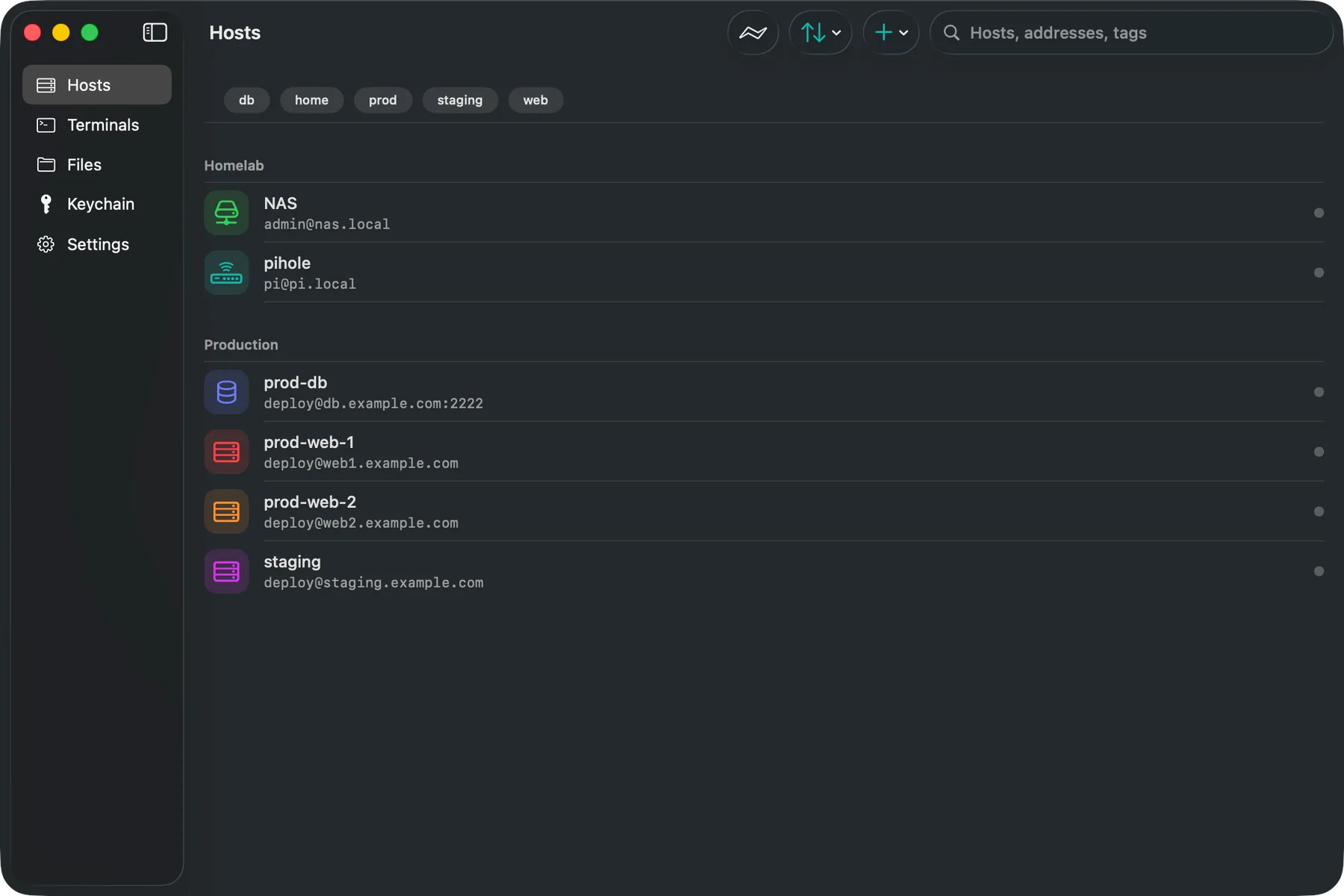
Group servers, tag them, give each an icon and a color. Quick Connect (⇧⌘K on the Mac), Siri Shortcuts and Spotlight get you connected in seconds. Bring the list you already have — an ssh config, or a JSON or CSV export from another client. On the Mac, each window keeps its own place, and the menu bar item has your recent hosts.

Moray on iPhone: hosts grouped into Homelab and Production, each with a colored icon and tags.

jumpPRO

Through the bastion, and the one behind it

ProxyJump chains are dialled hop by hop — a, then b through a, then the target through b — each hop held to its own pinned key and asked about if it's new. A missing hop blocks the connection; Moray never quietly falls back to dialling the target directly.

ProxyJump bastion,inner

→ bastion ✓ → inner ✓ → prod-db

errors

Errors in plain words

“Couldn't reach db.example.com (DNS lookup failed)” instead of library text, with the raw details a tap away. A rejected password offers Enter Password…, not a Reconnect that would send it again.

✗ Couldn't reach db.example.com

(DNS lookup failed)

→ Details · Retry

autofill

Smart autofill

Moray recognises sudo, login, passphrase and one-time-code prompts and offers a host-scoped fill gated by Face ID or Touch ID. Type the password once, not forty times a day.

[sudo] password for deploy:

→ Fill from Moray · Face ID

deploy is in the sudoers file.

snippets

Snippets with placeholders

Save the commands you run constantly, leave fill-in blanks where the arguments go, and run or paste them into any session. Three are free; Pro makes it unlimited.

Moray on iPhone: saved command snippets with fill-in placeholders.

themes

Make it yours

Start from the built-in terminal themes, or — with Pro — design your own with a full color editor that syncs to every device. Font, size, line height and cursor style are yours either way.

Moray on iPhone: the terminal theme picker with a live preview and color editor.
02 — screens

The whole app, one screen at a time

iPhone · dark · en-US

  • Moray on iPhone — Terminal: Tabs, color, searchable scrollback

    Terminal

    Tabs, color, searchable scrollback

  • Moray on iPhone — Hosts: Groups, tags, icons, Quick Connect

    Hosts

    Groups, tags, icons, Quick Connect

  • Moray on iPhone — Files: SFTP browse, edit, Quick Look

    Files

    SFTP browse, edit, Quick Look

  • Moray on iPhone — Tunnels: One-tap port forwards

    Tunnels

    One-tap port forwards

  • Moray on iPhone — Keychain: Ed25519 & RSA, biometric-gated

    Keychain

    Ed25519 & RSA, biometric-gated

  • Moray on iPhone — Snippets: Commands with placeholders

    Snippets

    Commands with placeholders

  • Moray on iPhone — Themes: Built-in or build your own

    Themes

    Built-in or build your own

  • Moray on iPhone — Privacy: What syncs, what never does

    Privacy

    What syncs, what never does

scroll →

03 — every platform

One app. Three idioms.

On Mac it is a proper Mac app: every window keeps its own place, Settings live in ⌘,, every shortcut sits in the menus, terminals split with ⌘D, and Files is a sortable table you can drop Finder files into. On iPad a file pane can sit beside the terminal, and with Pro the file manager splits into two. On iPhone it is four tabs and a Smart Bar you can reach one-handed. Same SwiftUI codebase, three genuinely native shapes.

  • ⇧⌘K Quick Connect on Mac
  • Split panes: ⌘D, ⇧⌘D
  • Drop files on a terminal to upload
  • Menu-bar item on Mac
  • Siri Shortcuts & Spotlight
  • Live Activity for tunnels (iPhone)
Moray on Mac: the Hosts list in a sidebar layout, servers grouped with colored icons and tags.Moray on iPhone: a terminal session with the Smart Bar above the tab bar.

04 — private by design

The parts of your setup we never see

Most SSH clients ask you to trust a company with the keys to every server you own. Moray is built so that trust is never required.

No account, and none to make

There is no Moray login, no email verification, no forgotten-password flow. You open the app and add a host.

No vendor server in the path

Your device connects straight to your server. We operate nothing your traffic passes through, so there is nothing of yours for us to lose.

Sync is your iCloud, or nothing

With Moray Pro, hosts, groups, snippets and known host keys move through the private database in your own iCloud account. Leave it off and they stay on the device.

Keys sync only if you say so

Private keys and saved passwords live in the device Keychain, biometric-gated and device-local by default. One switch shares them through iCloud Keychain — end-to-end encrypted by Apple — and nothing else moves them. They are never in the app's synced store.

05 — pricing

Free core. Pro from $0.99.

The free tier is the app, not a demo — terminal, SFTP, keys, the host-key checks and host organization, with no host limit. Pro adds sync, tunnels, jump hosts and the power-user extras, for less than a dollar a month. We can price it that way because there is no server of ours to pay for — and if subscriptions are not your thing, buy it once.

Free

$0

forever, no account

The terminal, SFTP, keys and host organization. Not a trial — the actual app.

Pro · monthly

$0.99

per month

The full Pro unlock, month to month. Cancel from the App Store whenever.

Pro · yearly

$7.99

per year — save 33%

The same unlock for what eight months would cost. The one most people want.

Pro · lifetime

$24.99

once, then never again

About three years of the yearly plan, paid once. No subscription, no expiry.

Prices in USD, billed through the App Store (or on the web for the direct Mac download); local pricing may differ.

Which capabilities are free and which need Moray Pro
capabilityfreepro
Unlimited hosts, groups, tags & Quick Connect✓✓
Terminal sessionsup to 3 open at once; unlimited with Pro✓✓
Command history, searchable per host✓✓
Single-pane SFTP: browse, transfer, edit✓✓
Transfer queue: reorder, pause, rename, retry✓✓
Ed25519 / RSA keys in the Keychain, ~/.ssh import✓✓
Host-key trust prompt, randomart & Known Hosts✓✓
Smart autofill for sudo, login & passphrase prompts✓✓
Snippets with placeholders3 free; unlimited with Pro✓✓
SSH config, JSON & CSV import · JSON backup✓✓
Biometric app lock✓✓
iCloud sync of hosts, snippets & host keys—✓
iCloud Keychain sync of keys & passwords—✓
Port-forwarding tunnels (incl. the Mac menu bar)—✓
Jump hosts, including multi-hop ProxyJump—✓
Automatic key auth (each key offered in turn)—✓
Dual-pane SFTP & server-to-server copy (iPad, Mac)—✓
Hosts mounted in the Files app (iPhone, iPad)—✓
Custom terminal themes—✓
Recent-hosts widgets (iPhone, iPad)—✓

Add your first host in about a minute.

Import your ~/.ssh/config, or type a hostname. Free, no account, nothing to cancel.

06 — guides

SSH, explained properly

Practical guides to keys, tunnels, jump hosts and running a homelab from an iPhone — written by someone who uses them daily.

all guides →
07 — faq

Questions, answered

What is Moray?
Moray is a native SSH, SFTP and terminal client for iPhone, iPad and Mac. It gives you a real terminal with tabs, an SFTP file manager with a transfer queue, port-forwarding tunnels, and proper key management — with your hosts syncing over your own iCloud (Moray Pro) and your keys staying in the device Keychain.
Do I need an account?
No, and there isn't one to create. Moray has no vendor account and no vendor server. With Moray Pro, your hosts, groups, snippets and known host keys sync through your own iCloud via CloudKit. If sync is off, your servers' details stay on the device; the only things the app sends anywhere are its purchase check and, unless you switch them off, anonymous crash reports and usage counts.
Where are my private keys stored?
In the device Keychain — encrypted at rest and gated behind Face ID or Touch ID. Key material is device-local by default and only ever syncs if you explicitly enable iCloud Keychain sync. It is never written to Moray's own data store and never sent to us.
Can it import my existing ~/.ssh/config?
Yes. Moray parses an OpenSSH config, including Host blocks, HostName, User, Port, IdentityFile, ProxyJump and LocalForward lines — so your hosts and tunnels arrive already set up rather than being retyped. It also reads host lists exported from other clients: point it at a JSON or CSV export and it picks out the addresses, usernames and ports, turning the folders into Moray groups. On the Mac, Import from ~/.ssh reads the whole folder in one go: your keys go into the Keychain as they are (encrypted ones stay encrypted), and each host is linked to its IdentityFile.
Can I get to my server from other apps?
On iPhone and iPad, with Moray Pro, yes. Switch on “Show in Files” for a host and it appears as a location in the Files app, so any app that opens or saves a document can reach it directly. It runs as its own extension, so Moray doesn't have to be open. It needs the host's password or key saved on the device, because an extension has nowhere to ask you for one.
Does it support jump hosts and bastions?
Yes, including chains: ProxyJump bastion,inner dials each hop through the one before it, and every hop is held to its own pinned host key. If a hop is missing, the connection stops rather than going direct. Jump hosts are part of Moray Pro.
How does Moray know it's talking to the right server?
The first time you connect, it shows the server's fingerprint and its randomart key picture and waits for you to choose Trust & Connect. From then on the key is pinned. If it ever changes, Moray stops and shows a “Server identity changed” screen with both keys side by side; Cancel is the default. Nothing is trusted silently — a background reconnect that meets a new key fails instead of asking where nobody is looking.
What's free and what's paid?
Free forever: unlimited hosts, the terminal with up to three sessions open at once, command history, the single-pane SFTP file manager and its transfer queue, the editor, key management and ~/.ssh import, host-key checks, autofill, three snippets, Quick Connect, the app lock and backup. Moray Pro adds iCloud sync, iCloud Keychain sync, port-forwarding tunnels, jump hosts, automatic key auth, dual-pane and server-to-server copy, Files-app mounts, unlimited terminals and snippets, custom themes and widgets — $0.99 a month, $7.99 a year, or $24.99 once for lifetime. If you installed Moray before 1.1, the dual pane, Files mounts, extra terminals and jump hosts you already had stay free.
Does it work offline?
Your hosts, snippets, keys and settings are all local, so the app opens and works without a network. You obviously need connectivity to reach a server.
Who is building it?
Bartłomiej Żabicki — an iOS developer writing Swift since 2015, who wanted a terminal on iPad that felt like Apple built it and didn't ask for an account. Moray is that app.
08 — contact

Tell me what's missing

A protocol Moray should speak, a server it chokes on, a shortcut you keep reaching for — it all reaches the person who writes the code. Or email hello@bartstudio.io.

emailed to us so we can reply, nothing else — privacy policy